
Frontend performance optimization
References
Context
When asked about performance optimization in an interview, it is best to break the answer down by architectural area. Here are some key points:
Depth checks whether you understand the details deeply enough to solve them yourself. Breadth considers the entire requirements process, which can be broken down with 5W2H:
- Optimization target (What): clarify the target, such as first-screen load speed.
- Requirement value (Why): consider the benefit through technical metrics (FMP, TTI) and business metrics (bounce rate, DAU, LT).
- Development cycle (When): get involved from before development through after release.
- Project collaboration (Who): identify the owner and collaborators for the optimization effort.
- Optimization scope (Where): focus on the core business path and identify performance bottlenecks.
- Technical solution (How): define concrete optimization strategies and an action plan.
- Cost evaluation (How much): evaluate the cost and benefit to ensure the solution is feasible and sustainable.
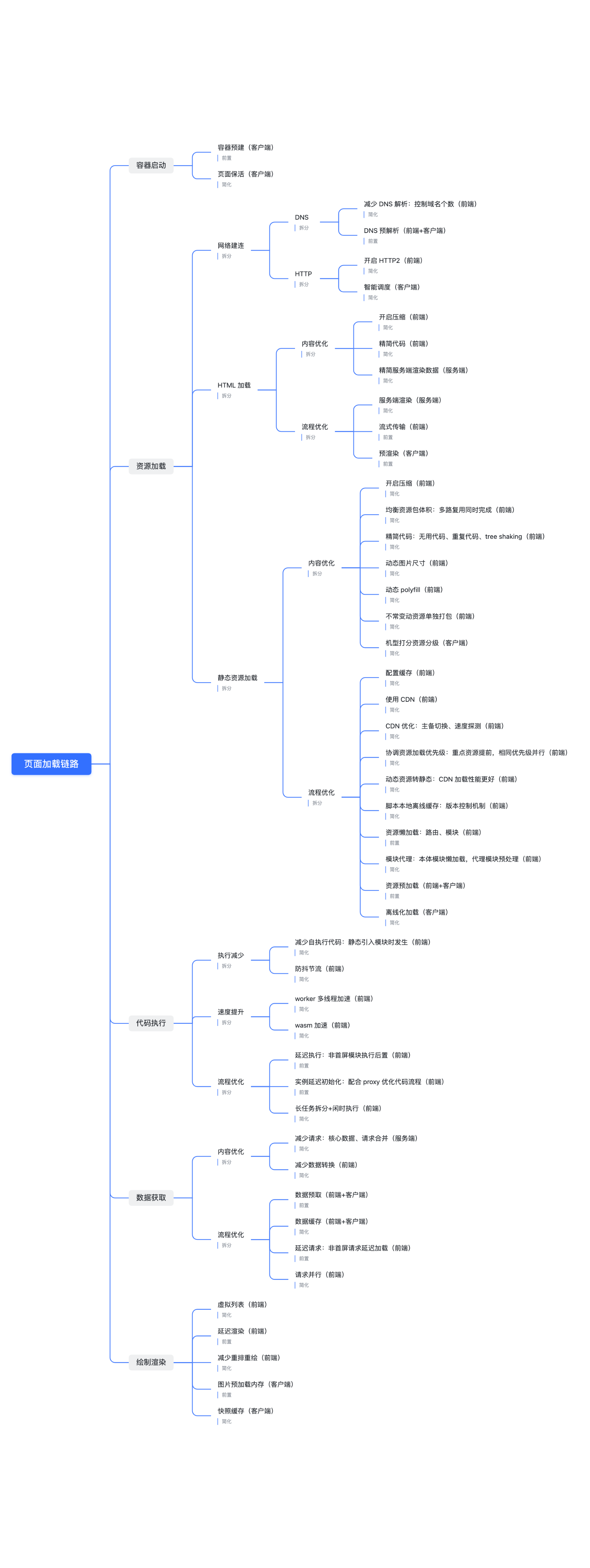
Performance optimization techniques
Here are some ways to improve performance metrics:
Compress text
Improve FCP, SI, and LCP
Enable Gzip compression in frontend build configuration such as webpack, and enable it on the backend such as Nginx as well. Source code is mainly compressed using the principles of Gzip, including LZ77 and Huffman coding.
Prevent layout shifts from images
Improve CLS (Cumulative Layout Shift)
Common causes of layout shifts and their solutions:
- Images have no dimensions: explicitly set
widthandheighton the<img>tag. - Dynamically loaded content: reserve fixed placeholder elements for ads and dynamic content.
- Font loading: use
font-display: swapto avoid layout jumps while fonts load.
Defer JavaScript
Improve FCP and LCP
JavaScript has two relevant attributes, defer and async:
- defer: load later and execute after HTML parsing is complete.
- async: load asynchronously and execute as soon as it finishes, which may block the rendering thread.
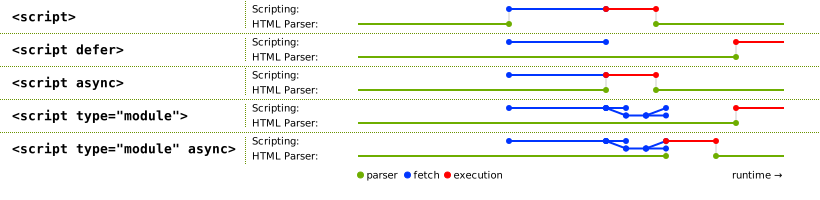
Reduce JavaScript execution time
- Use throttling and debouncing.
- Use
useCallbackanduseMemo.
Reduce asset size
- Compress images to WebP.
Preload the LCP image
- Import on demand.
- Use preload.
Lazy-load some resources
- Lazy-load images.
- Lazy-load components.
- Lazy-load routes.